

They are built and running, but switched on account by account while we prove them in real service. Bookings will not appear in your portal until we enable them. Ask us on the contact form and we will turn them on.
A loyalty scheme rewards people for coming back. Bookings is the part that gets them through the door in the first place — and then makes the visit count without anyone having to remember to scan a card.
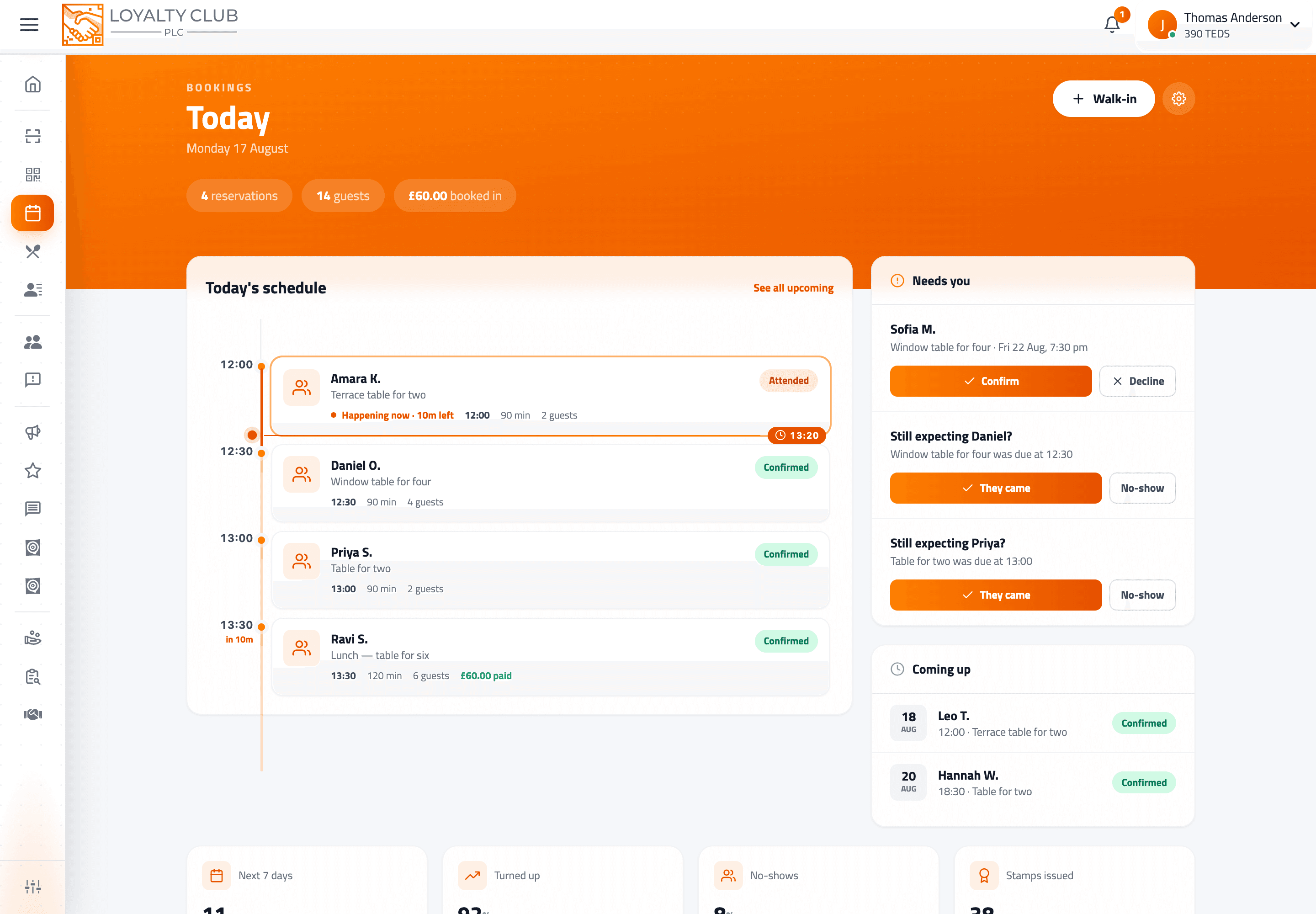
Customers book you from your Loyalty Club page at eleven at night when you are closed. You see the day laid out in one timeline. When they turn up, you tap They came, and their stamp lands.
Two modes, one diary
You choose which when you set up, and it shapes everything else.
| Mode | For | How it works |
|---|---|---|
| Appointments | Salons, barbers, clinics, studios | Each service has its own length and price. Customers pick a service, optionally a specific team member, then a time. |
| Tables and parties | Restaurants, cafés, bars | Customers pick a party size, then a sitting. You set how long a sitting lasts and how many you can seat at once. |
The difference matters most in what the customer picks first. An appointment customer chooses what; a table customer chooses how many of them there are.
What the customer does
- 01They find you
Your business page in the member app, or your pin on the partners map. Businesses taking bookings carry a Takes bookings badge in search results.
- 02They tap Reserve a table or Book an appointment
Which of the two they see depends on your mode.
- 03They pick
A service and optionally a team member, or a party size — then a day and a time. Times are grouped into morning, afternoon and evening, and only genuinely free slots are offered.
- 04They confirm
With an optional note for allergies or access needs, and whichever way of paying you allow.
Booking needs a Loyalty Club account — there is no anonymous booking. That is deliberate: an account is what lets the stamp land on a card and the reminder reach a phone. Anyone can still walk in, and you can add them to the diary yourself.
Your four screens
All under Bookings in the side navigation.
| Screen | What it is for |
|---|---|
Today (/bookings) | The day as a timeline, with a live line marking now. Approve requests, add walk-ins, mark people attended. |
Schedule (/bookings/schedule) | Everything upcoming, grouped by day, filterable — the screen you open when someone rings up. |
Set up bookings (/bookings/setup) | The five-step first-run wizard. |
Booking settings (/bookings/settings) | Everything you change afterwards: services, hours, payment, rewards. |
The two guarantees
A slot cannot be sold twice. Every booking takes an exclusive hold on each five-minute cell of time it occupies, enforced by the database itself rather than by a check that might run twice at once. Two people tapping the last seven o'clock table at the same moment cannot both get it — one is offered the next free time instead. This holds whether the clash comes from the app, a walk-in you add, or a member of staff on another device.
Turning up is what earns the stamp. Not booking, not paying — attending. Marking someone attended runs the same loyalty engine as scanning their QR at the till, so a kept appointment counts exactly like a counter visit. See Running the day.
You decide how much control you keep
Set once, applied to every booking:
- Confirm automatically, so a free slot books instantly — or approve each request, so nothing is promised until you tap Confirm.
- Shortest notice, so bookings cannot ambush you — an hour by default.
- How far ahead people can book — 30 days by default.
- A cancellation window, outside which customers cancel themselves and any prepayment refunds automatically.
All of it is in Setting up bookings.
What it does not do yet
Being straight about the edges:
- No rescheduling. A customer who needs a different time cancels and books again.
- No deposits or partial payments. Prepayment is the full price or nothing.
- No waiting list when a day is full.
- No recurring bookings — a weekly regular books each visit.
- No table plan. Tables mode manages how many you can seat at once, not which table is which.
- No two-way calendar sync with Google or Outlook.
In one sentence
Customers book a table or an appointment from your page without ringing you, you run the day from one timeline that cannot double-book, and marking someone attended awards their loyalty stamp automatically.