

Some Loyalty Club partners let you book them straight from the app — a table for Friday, or a haircut on Tuesday — without ringing up or waiting for opening hours.
Finding a business that takes bookings
Look for a Takes bookings badge when you search the map, or open the business and look at the top of their page. You will see one of two buttons depending on what they are:
- Reserve a table — restaurants, cafés and bars.
- Book an appointment — salons, barbers, clinics and studios.
You need to be signed in to your Loyalty Club account to book. That is what lets your stamp land afterwards and your reminders reach you.
Booking
- 01Choose what you're booking
At a restaurant you pick how many of you there are. Everywhere else you pick a service — each shows how long it takes and what it costs.
- 02Pick a person, if you'd like to
Some businesses let you ask for someone by name. Choosing Anyone usually means more times to pick from.
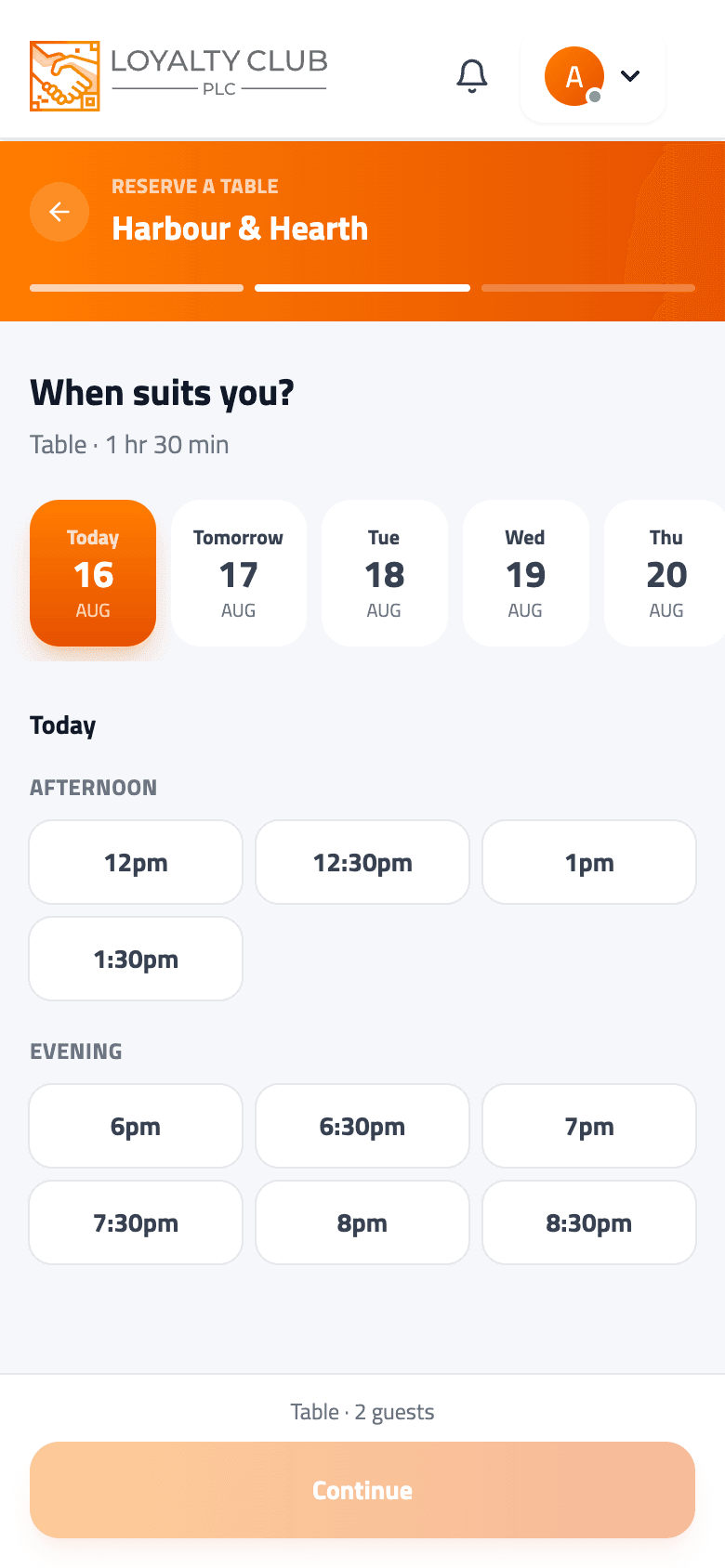
- 03Pick your time
Swipe along the days, then choose from the times grouped into morning, afternoon and evening. Only times that are genuinely free are shown, and a time getting close to full says how many are left.
- 04Check and confirm
You will see the date, time, length and price. There is a note box for anything they should know — allergies, access needs, a request.
If a day is full it says Fully booked and offers to jump you to the next day with something free.
Ways to pay
Which of these you see depends on the business:
- Pay at the venue — nothing now, settle when you get there.
- Pay by card now — a secure checkout, including Apple Pay and Google Pay.
Paying now secures your slot, and you can still cancel for a refund within the business's cancellation window.
Your slot is only held for a few minutes while you pay. If you close the checkout without finishing, the time goes back up for someone else and the booking expires on its own. There is nothing to cancel — just book again.
Instantly confirmed, or a request
Most businesses confirm on the spot. Some prefer to look at each booking first, and when that is the case the app tells you before you confirm — the button reads Request booking, and your booking shows as Awaiting confirmation until they accept it. You will get a notification either way.
My Bookings
Everything you have booked is under My Bookings, with Upcoming and Past tabs. Your next booking also appears on your home screen with how long until it.
Each booking shows the business, what you booked, the date and time, who it is with, its status and its reference. The price line tells you where you stand — paid, refunded, or to pay at the venue.
Statuses you might see:
| Status | Meaning |
|---|---|
| Confirmed | You're booked in. |
| Awaiting confirmation | The business is reviewing your request. |
| Payment pending | Your card payment hasn't finished yet. |
| Attended | You went. |
| Cancelled / Cancelled by venue | Called off, by you or by them. |
| Expired | A card booking where payment was never completed. |
Been somewhere before? Past bookings you attended carry a Book again button that takes you straight back to the same service.
Reminders
You do not need to set anything up. A reminder arrives the day before and again about two hours before, so a booking made three weeks ago does not quietly slip past you.
Reminders come as notifications on your phone, and the day-before one is also emailed.
Cancelling
Open the booking in My Bookings and tap Cancel. You will be asked to confirm, and the slot goes straight back so somebody else can use it.
If you paid by card or with tokens and cancel outside the business's cancellation window, your money comes back automatically — card refunds take a few working days, tokens return to your wallet straight away. Cancel closer than that and it is not refunded automatically; contact the business directly. Windows vary, but 24 hours' notice is common.
There is no way to change a booking to a different time — cancel it and book the new time.
Your stamp
Where the business runs a loyalty campaign, turning up earns you a stamp — the same as if they had scanned your QR at the till. It is awarded when the business marks you as attended, so it appears shortly after your visit rather than the moment you book, and your booking then shows a Stamp earned chip.
Booking and paying alone do not earn it. The visit does.
If you went and no stamp arrived, see My stamp didn't appear.
In one sentence
Find a partner that takes bookings, pick your time and confirm from your phone, and you will be reminded before it's time — then turning up earns your stamp automatically.