
Skip to content
Loyalty Club PLC
What's new

Updates

What we have added, improved and fixed across the partner portal, the partners app and the members app, newest first.

November 2026

New featureFor businesses

Preview a message before you send it

See a message campaign exactly as members will before it goes out.

For businesses

  • Preview a message campaign exactly as members will see it before you send it.

Also fixed

  • A table guest can open their running bill from the menu page again, and a declined card elsewhere can no longer be mistaken for a problem with your subscription.
New featureFor membersMembers app 3.3.0

Members app 3.3.0

Order from the Shops of the partners you belong to, here in the app.

Shops

  • Order from a partner's Shop for collection, local delivery or by post
  • Find Shops on Home, and open products from a partner's messages and emails
  • Bundle deals, discount codes, and a full loyalty card to spend on an order
  • Send an order to someone else with a card message, and track a parcel

Saved details

  • Save your phone and addresses for a quicker checkout, and change or forget them in Settings

Also

  • General improvements and minor bug fixes throughout
New featureFor businesses

See who opened your emails, and who clicked

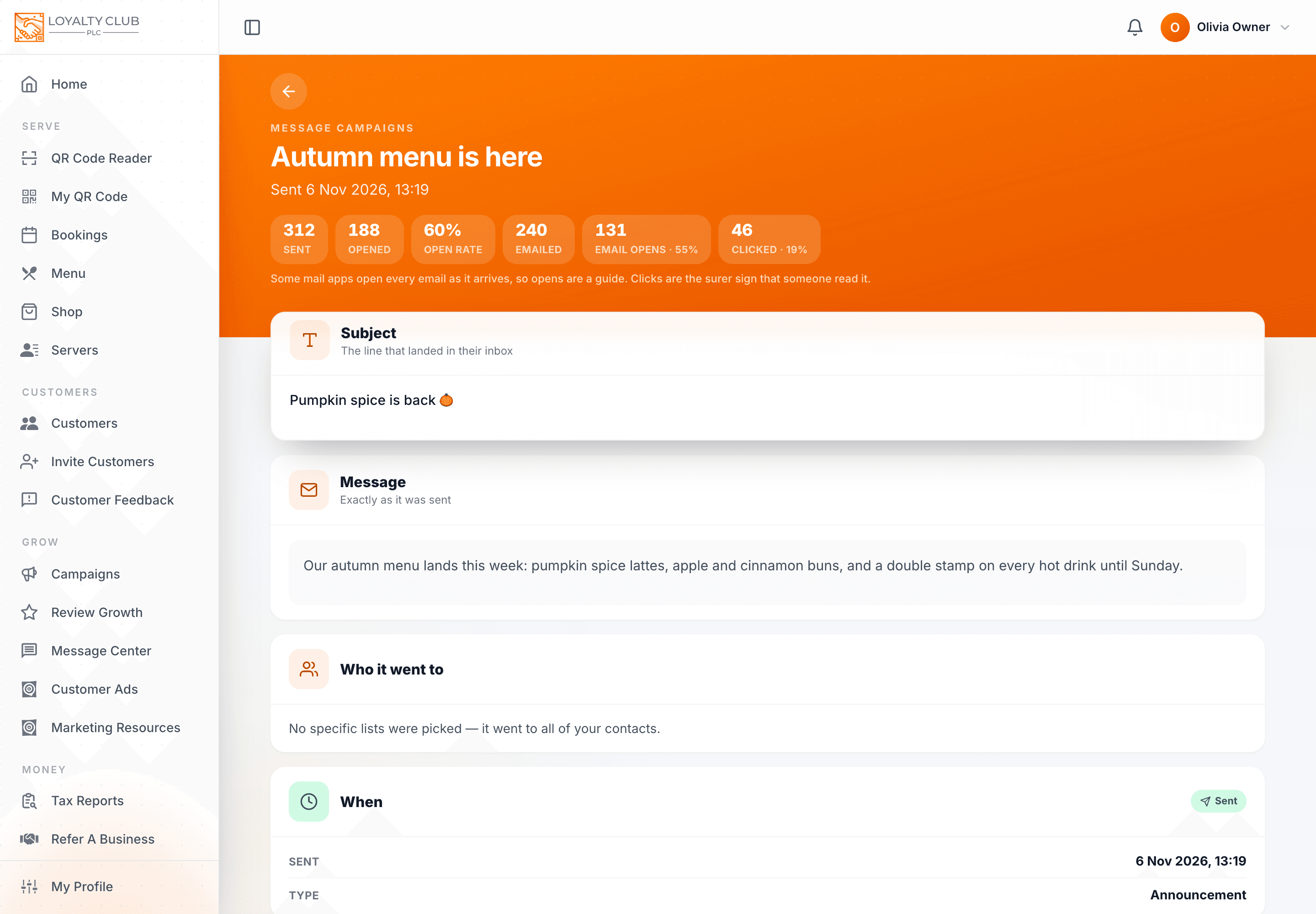
Every email campaign's report, and every automatic email, now shows how many were opened and how many had a link clicked, so you can tell which subject lines and offers land.

  • A sent campaign's report shows Emailed, Email opens and Clicked, each with its rate, beside the in-app figures.
  • Each automatic email on the Emails tab shows its open and click rates.
  • Some mail apps open every email as it arrives, so opens are a guide; a click is the surer sign. Figures count emails sent from 6 November.
A sent campaign's report: 240 emailed, 131 email opens (55%) and 46 clicked (19%).

How to use it →

New featureEveryone

Gift vouchers

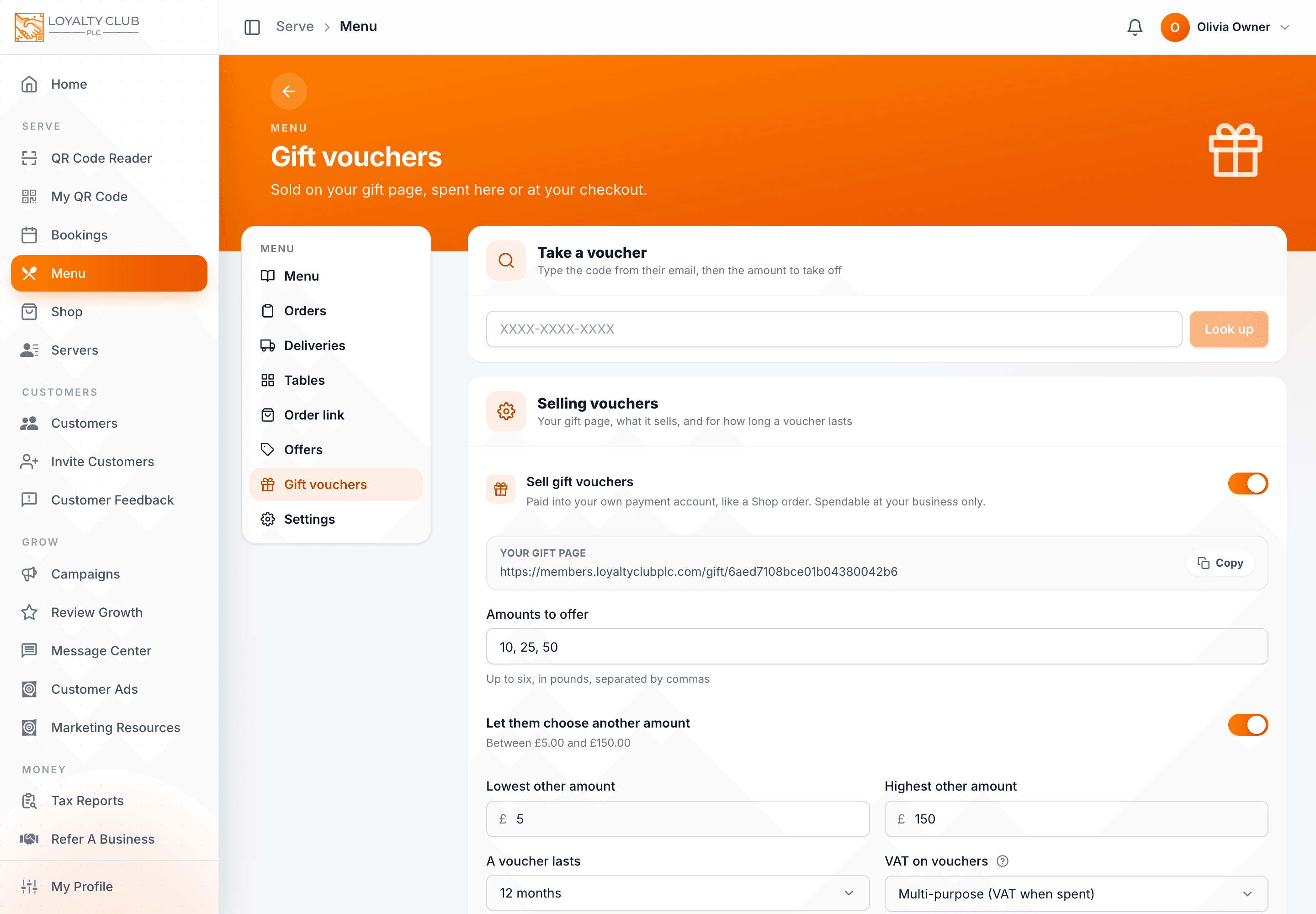
Businesses with the Shop (in early access) can sell gift vouchers from their own gift page. Vouchers are spent at the till or at the business's online checkout, over as many visits as it takes.

  • Choose the amounts, a custom range, how long a voucher lasts and its VAT treatment, and share your gift page. Payments go straight into your own payment account.
  • Take a voucher at the till: type the code, take off any amount up to what is left.
  • Customers spend a voucher on a Shop or Menu order, in one go or over several.
  • See every voucher sold and what is still to be spent, and resend a lost voucher email.
Gift vouchers page: take a voucher at the till, and the gift page settings.

How to use it →

New featureFor businesses

A monthly report on what your club made you, and alerts that win members back

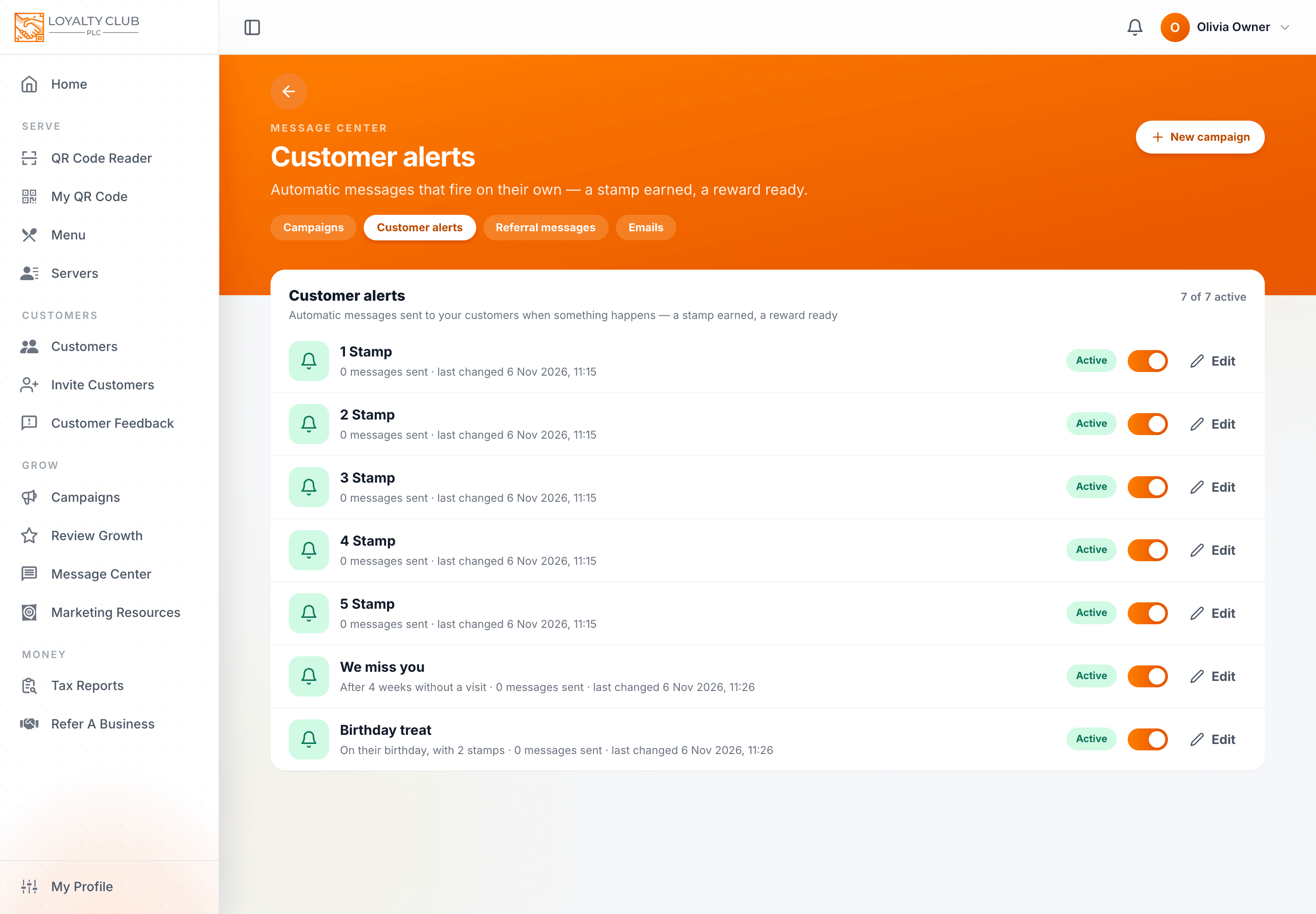
Owners now get an email in the first week of each month showing what their club did last month. Two new customer alerts bring people back on their own: "We miss you" for members who have gone quiet, and a "Birthday treat" that can add stamps to their card on the day.

  • Your monthly report: new members, visits and how many were repeat visits, what members spent, rewards handed over, bookings that turned up and reviews, each against the month before. Switch it off, or read last month's now, in Notifications → Settings. More about the report
  • We miss you: choose how long without a visit (2 to 26 weeks) before a member gets a friendly nudge, once each time they drift away.
  • Birthday treat: a message on the member's birthday, with 1 to 5 stamps on one of your cards if you like.
  • Both alerts start paused, so nothing goes out until you switch them on in Message Centre → Customer alerts.
Customer alerts list with We miss you set to after 4 weeks without a visit and Birthday treat with 2 stamps.

How to use it →

October 2026

New featureEveryone

Pay in the app's own screen, and send a message to members you choose

Members now pay for orders and bills in a branded payment screen with Apple Pay and Google Pay, and check out in clear steps. Businesses can pick exactly which members receive a message and see who was left out and why.

For businesses

  • Send a message to members you pick by name or email (up to 50), for a thank-you, a follow-up or a test to yourself.
  • After a message campaign goes out, see who it left out and why.
  • Campaign names now have a 15-character limit with a counter, so they are never cut short on a member's phone.
  • Your logo now appears on your online Menu page.

For members

  • Pay for orders and table bills in the app's own payment screen, showing the business's name and logo, with Apple Pay and Google Pay where your device has them (also in the Members app 3.3.0).
  • Checkout now goes in three clear steps, and finds your address as you type it.

Also fixed

  • Each message now appears only once in your inbox, and iPhones no longer zoom in when you tap into a form field.
  • If a Menu settings save fails, the reason stays on screen, and a page that did not finish downloading now reloads itself.
New featureEveryone

Online ordering for every business: click and collect, delivery and table ordering

Every business can now take orders and payments online from its Menu: at the table, for collection or for local delivery, with discount codes, bundle deals and stock counts. Members can check out faster with saved details and spend a full loyalty card on an order.

For businesses

  • The Menu is now open to every business: take orders at the table by QR code, or share your shop link for click and collect with your own collection slots.
  • Deliver to the postcodes you choose, with a different charge for each area, and plan the day's deliveries in driving order with a sheet to print.
  • Create discount codes and bundle deals for your customers, and count stock so items show as sold out by themselves.
  • Take card payments through your own Square or Revolut account, with our 1% fee shown clearly in Settings, and a short checklist to get selling online.
  • Photograph a printed menu and we will read it into your Menu for you.
  • The Menu screens have a cleaner new look, and you can cancel an online order from the board.

For members

  • Order online from a business for collection or delivery, with a gift message for someone else if you like.
  • Spend a full loyalty card on an online order, or type in a discount code.
  • Save your phone number and delivery addresses for one-tap checkout, and manage or forget them in Settings.
  • Checkout shows who you are buying from and links to their terms of sale, and tells you when only a few of something are left.

September 2026

New featureFor membersMembers app 3.2.0

Members app 3.2.0

Answer a club's questions and join from their link, with nothing to install first.

Joining a club

  • Open a club's link and get going from the web — nothing to install before you join

Questions from a club

  • Answer them from the link in the email, here in the app
  • Every question says who is asking and why, and the keyboard matches what it wants

Signing in

  • Sign in with Apple or Google at an address we do not know yet, and we will offer to create your account

Also

  • General improvements and minor bug fixes throughout
New featureEveryone

Invite your existing customers, and sign in with Apple or Google

Businesses get a join link and a ready-made invite email to bring in the customers they already have, plus better questions to get to know members. Members can sign in with Apple or Google and join a business straight from its link.

For businesses

  • New Invite Customers page: copy or share your join link, see how many people joined through it, and send it with a ready-made invite email in three styles to paste into Gmail, Outlook, Apple Mail or Mailchimp.
  • Getting to know your members is more flexible: questions can be words, dates or multiple choice, each with an optional "why we ask" line.
  • Send an "Ask your questions" message to any list, leaving out members who have already answered.
  • The till can now read a member's QR code from a photo.
  • A campaign now shows its reward beside it, and the customer page shows the campaign's rules.

For members

  • Sign up and sign in with Apple or Google (also in the Members app 3.1.0).
  • Join a business straight from its own link: see its rewards first, then sign up or sign in and land back on it.
  • A new "Your info" section in Settings lets you answer each business's questions, and you can see why they are asking.
  • Phone, email and number questions bring up the right keyboard.

Also fixed

  • Opening hours now show correctly in the members portal (some businesses were wrongly shown as closed), and choosing a reward photo works again.
New featureFor membersMembers app 3.0

Members app 3.0

The card, rebuilt: stamps that land while you watch.

Watch your stamps land

  • Stand at the counter and your card updates on the screen you are already looking at, with a buzz and a note of how many stamps you just earned
  • Tap a notification about a stamp and it opens that card
  • Home leads with the cards you use most, and how close each reward is

Your card, and your code

  • Your QR is drawn on your phone, so it opens instantly and works with no signal
  • The screen stays bright while your code is up, so a till can read it across the counter
  • A six-character member code sits under it, for a till whose camera cannot read a screen
  • Add your card to your phone's wallet so it is always to hand

Joining a new place

  • One scanner for every partner's QR — point at it and their rewards open straight away, with a torch and a photo option for awkward light
  • Every card explains how it works: what earns you stamps faster, and what is good to know
  • You choose once, right after joining, whether you want offers from that business — nothing pre-ticked, and you can change your mind any time
  • Leave a scheme whenever you like; your stamps and history are kept, so joining again later picks the card back up

Ordering and booking

  • At participating businesses the QR on your table is the menu: browse dishes with photos, prices and allergen information on your own phone
  • Order and pay without waiting to catch anyone's eye — by card or with TEDS tokens
  • Follow your order from Sent to Accepted, Preparing and Ready, with the receipt to hand
  • Your bill lists every round, when it was settled, and the stamps the visit earned you
  • My Bookings keeps everything you have coming up in one place, and adds a booking to your phone's calendar in one tap

TEDS tokens

  • Trade from the card itself: sell a stamp, buy the one you are missing, or sell a reward — each showing what it is worth, the fee, and your balance afterwards
  • Your wallet groups every transaction by day and says plainly what it was and what it was worth

A fresh look

  • Every screen rebuilt on one clean design, with a floating bar for Home, your QR, scanning and alerts
  • Light and dark themes, and a quicker start
  • Settings opens one section at a time instead of one endless page
  • Refer a friend and recommend a business are rebuilt: your code, your link and the ways to send them are there from the start

Also

  • Find participating businesses near you on the map, and get directions in your phone's maps app
  • Partner links and referral links open the app itself
  • General improvements and minor bug fixes throughout

Rolled into "General improvements" rather than listed (rewritten 9 Sept 2026): coming back to the app after a while could leave a page stuck loading; directions to a partner did not always reach the maps app.

New featureFor membersMembers app 3.0.1

Members app 3.0.1

Inviting a friend now shows exactly what you'll both get.

Inviting a friend

  • Your invite carries your referral code and says what an introduction is worth at that business: the stamps your friend gets, and the stamps you get
  • The page a friend lands on is rebuilt: their code first, the right store for the phone in their hand, and web sign-up with your invite already applied
  • On a phone, the code survives the trip to the store

Recommending a business

  • Telling us about a place you love is simply that: we approach them properly and let you know once they're live
  • The businesses you've introduced are listed with the date each one joined

Joining a scheme

  • The join sheet shows a picture of the reward beside each scheme, so you can see what's on offer

Signing in

  • Creating an account and resetting your password share the sign-in screen's design, and a mistyped email is caught on the page

Finding somewhere to go

  • Searching a town, city or postcode is quicker and steadier

Around every screen

  • The header names the section you're in, and the sidebar sits where it belongs on phone and iPad alike
  • Every card sits properly under its heading
  • Links to loyaltyclubplc.com open the app

Also

  • Your wallet appears once you've used it, and stays out of your way until then
  • General improvements and minor bug fixes throughout
New featureFor membersMembers app 3.1.0

Members app 3.1.0

Sign in with Apple or Google, and never invent another password.

Signing in

  • Sign in with Apple or Google. One tap, nothing to remember
  • Already a member at that address? It joins the account you have, and your password still works

Finding somewhere to go

  • The partners map searches faster and reads more clearly as you move around it

Also

  • General improvements and minor bug fixes throughout
New featureFor businessesPartners app 3.0.1

Partners app 3.0.1

Every rule now says who applies it.

At the till

  • Each card's rules are open the moment it appears, split into the ones the app applies for you and the ones you apply at the counter
  • The app tells you before you tap when a member has already collected today's stamp on a one-a-day card
  • Redeeming names the reward: "Hand Jane their Free Coffee?"

On a customer's page

  • Their cards list the same rules as the till, so a stamp given from here follows them too
  • A campaign that has ended shows as finished rather than offering a stamp

Also

  • General improvements and minor bug fixes throughout

For account holders

Building a campaign

  • The review step before you save shows the same split: the rules the platform applies automatically, and the rules your team applies at the till
  • A rule that needs no setting up keeps its identity, so a cap like "one stamp per visit" is applied exactly as written
New featureEveryone

A rebuilt till, and campaign rules your team can see

Scanning and stamping now happen on one faster, clearer till screen, and campaign rules are shown to staff at the counter. Members see stamps arrive on their card as they happen.

For businesses

  • One till replaces the three separate QR readers: scan a member, add stamps and hand over rewards from the same screen, on the web and in the Partners app (also in the Partners app 3.0.1).
  • A member who has just joined at the till can be stamped straight away, and the recent list says exactly what happened with each scan.
  • Handing over a reward now asks once to confirm, naming the member and the reward, because it cannot be undone.
  • Your campaign's rules are shown to staff at the till, and the platform now applies more of them automatically, such as a daily stamp limit and the minimum time between stamps.
  • When choosing rules you can set your own numbers (the hours of a happy hour, the day for a quiet-day double) and see in plain words what each rule does.
  • Settings and the Customers pages have been rebuilt to be quicker and easier to use on a phone, with a member's loyalty cards shown first on their page.

For members

  • Watch the stamp land: your card updates the moment you are stamped at the counter, with a small celebration.
  • Before joining a scheme you now see a picture of the reward itself, not just its name.
  • You can now leave a loyalty scheme without losing the stamps you have already earned, and mark all your messages as read in one go.
  • The campaign page has been redesigned, and a business's About page now has a "Find us" card.

Also fixed

  • Creating spend-based campaigns works again, a campaign name made only of numbers no longer stops the setup, and Marketing Studio posters print with their background.
  • Scanning a code that is not a business's (for example another member's card) now says what it is instead of showing an error, and password-reset emails always link to the right place.

August 2026

New featureEveryone

Dark mode for members, and push notifications in the Partners app

The members portal now has a full dark mode. Businesses using the Partners app get push notifications on their phone and a short note on what has changed after each update.

For businesses

  • Push notifications now reach your phone through the Partners app (also in the Partners app 2.33).
  • After the Partners app updates, it tells you what has changed.

For members

  • The whole members portal now has a dark mode, easier on the eyes in the evening.
New featureFor businessesPartners app 2.33

Partners app 2.33

The release that shipped push notifications.

Notifications

  • A bell in the app collects everything that needs your attention, kept for 90 days
  • Push notifications reach your phone the moment an order or booking arrives
  • Choose what alerts you — push and email, set category by category
  • Every staff login gets its own alerts on their own device

Also in this release

  • Faster, more reliable scanning
  • Fixes and performance improvements throughout
New featureEveryone

Notifications for every business, and a Home page that shows what needs you

Businesses get a notification bell with a full history and their own choice of alerts, and Home now opens on what needs attention today. Members see how close they are to their next reward the moment they open the app.

For businesses

  • A notification bell in the header shows your latest alerts with an unread count, and a Notifications page keeps the full history with filters.
  • Choose which kinds of alert reach you by push and which by email, and whether new orders play a sound on each device.
  • Notifications are now on for every business, so a failed subscription payment or a payment connection that needs renewing no longer goes unnoticed.
  • Home has been rebuilt around "what needs me today?": things waiting on you come first, then today's diary, then your numbers.
  • The navigation is tidied into clear groups, and there is now an easy way to reach every section on a phone.
  • "Action Alerts" in the Message Center is now called "Customer Alerts".

For members

  • Home now leads with your loyalty cards, nearest reward first, with anything ready to claim at the top.
  • The map of businesses has been rebuilt to make it easier to find places near you.
  • The members portal now uses the same clear navigation as the partners portal, and we now say "businesses" rather than "clubs" throughout.

Also fixed

  • A loyalty card that had just been completed no longer shows its progress as zero, and the notification badge now shows the true unread count.
  • Error messages are now written in plain English instead of technical codes, and pop-up windows sit in the centre of the screen on a computer.